 kakeratta
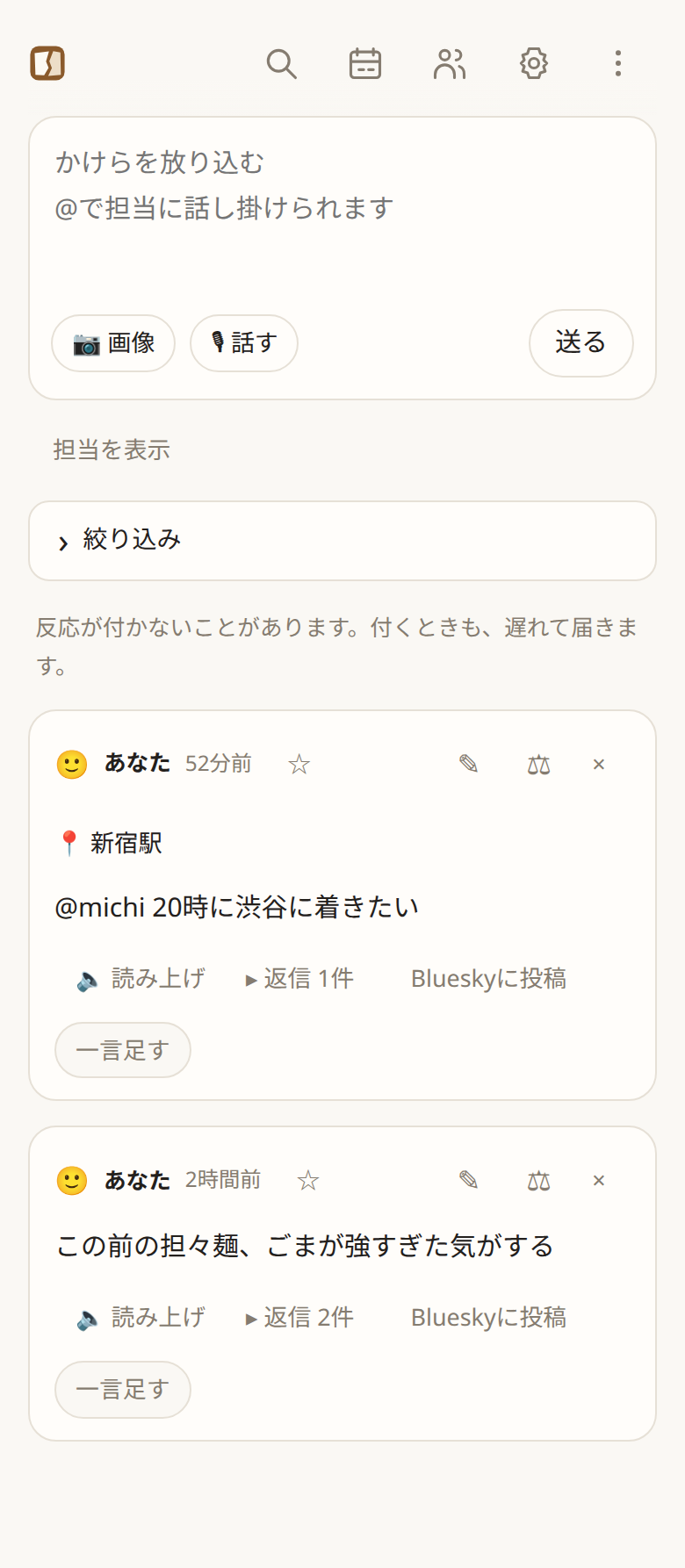
テキスト・画像・URL・音声Text, images, URLs, speech
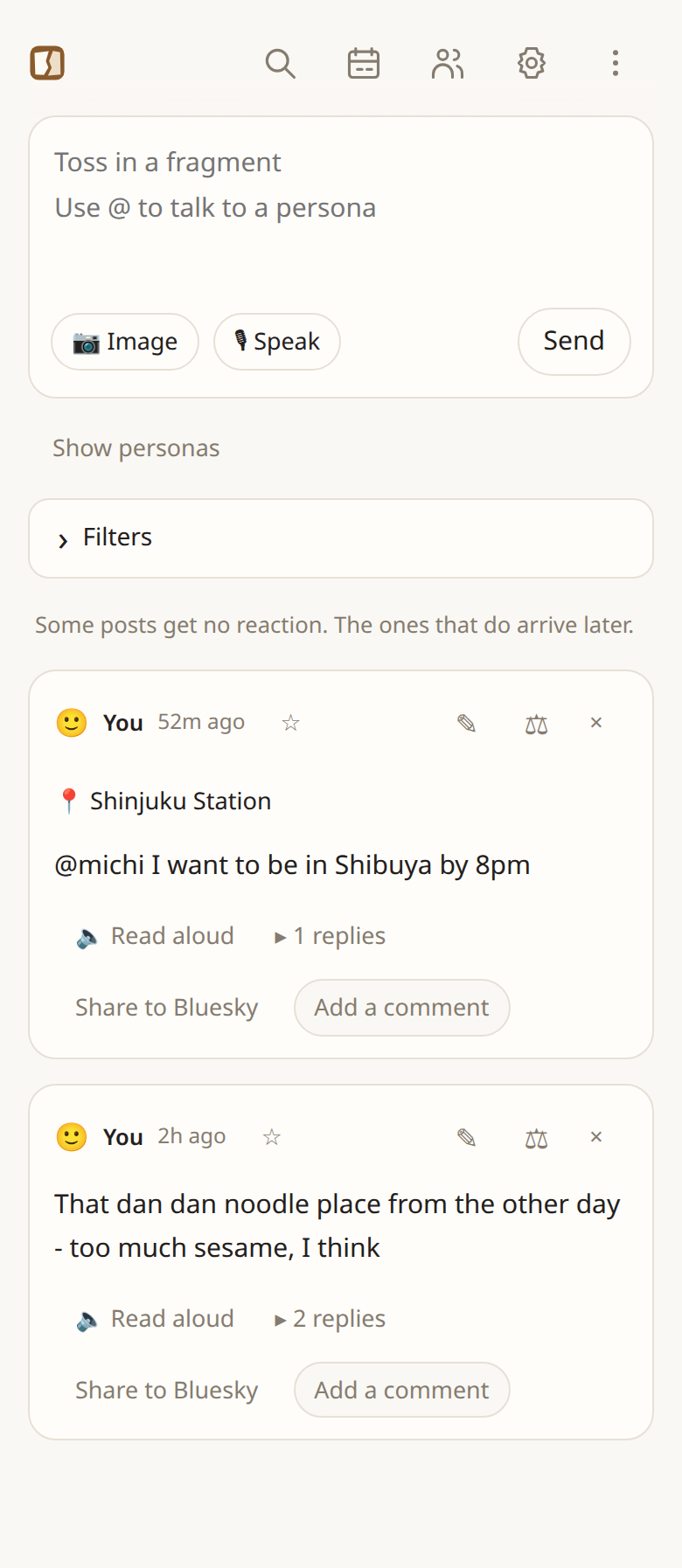
かけらを、放り込む。Toss in a fragment.
日々のかけらを、分類も考えずにひとつのタイムラインへ。人や関心ごとに置いた「担当」が、それぞれ自分だけの記憶を持ち、その人との約束や贈り物まで覚えていて、必要なときに思い出させてくれます。
Toss fragments of your day into one timeline without sorting anything. Personas you keep for the people and interests in your life each hold a memory of their own - down to the promises and presents - and bring things back when they matter.
大切な人のことほど、細かなことは忘れる。The people who matter most are the ones whose details slip away.
大切に思っていることと、その人との細かなことを全部覚えていられることは、別のことです。いつも気にかけてくれていた人がいました。忙しさにかまけてお礼の連絡を後回しにしているうちに、連絡するきっかけを失い、そのまま疎遠になってしまいました。
Caring about someone and remembering all the small things about them are not the same. There was someone who always looked out for me. Busy, I kept putting off thanking them, until there was no longer an occasion to get in touch, and we drifted apart.
贈り物、葉書、旅先のお土産、貸し借り、前に会ったときに話したこと。メモや写真に残しても、量が増えるほど見返さなくなり、残したこと自体を忘れてしまいます。AIにきれいに分類させても、誰かに片づけてもらった部屋のように、かえってどこにあるか分からなくなりました。
Presents, postcards, souvenirs, things lent and borrowed, what we talked about last time. Notes and photos pile up until I no longer look back, and forget I ever kept them. An AI that filed them neatly only made it worse, like a room someone else has tidied.
存在を忘れたものは、検索できない。You cannot search for what you forgot exists.
だから、人ごと・関心ごとに、自分とは別の記憶を持つ「担当」を置くことにしました。その人の名前が出たときに話を受け取り、済んでいない約束は覚えていて、会う日の朝や誕生日の前には自分から声をかけてくれる。何を覚えるかと同じくらい、いつ思い出させるかを大事にしています。kakerattaは、そこから始まりました。
So I gave each person, and each interest, a persona with a memory separate from mine. It hears about someone when their name comes up, keeps promises that are still open, and speaks up on the morning of a meeting or before a birthday. When to remind matters as much as what to remember. That is where kakeratta began.
人物:その人との記憶People: your memories with someone
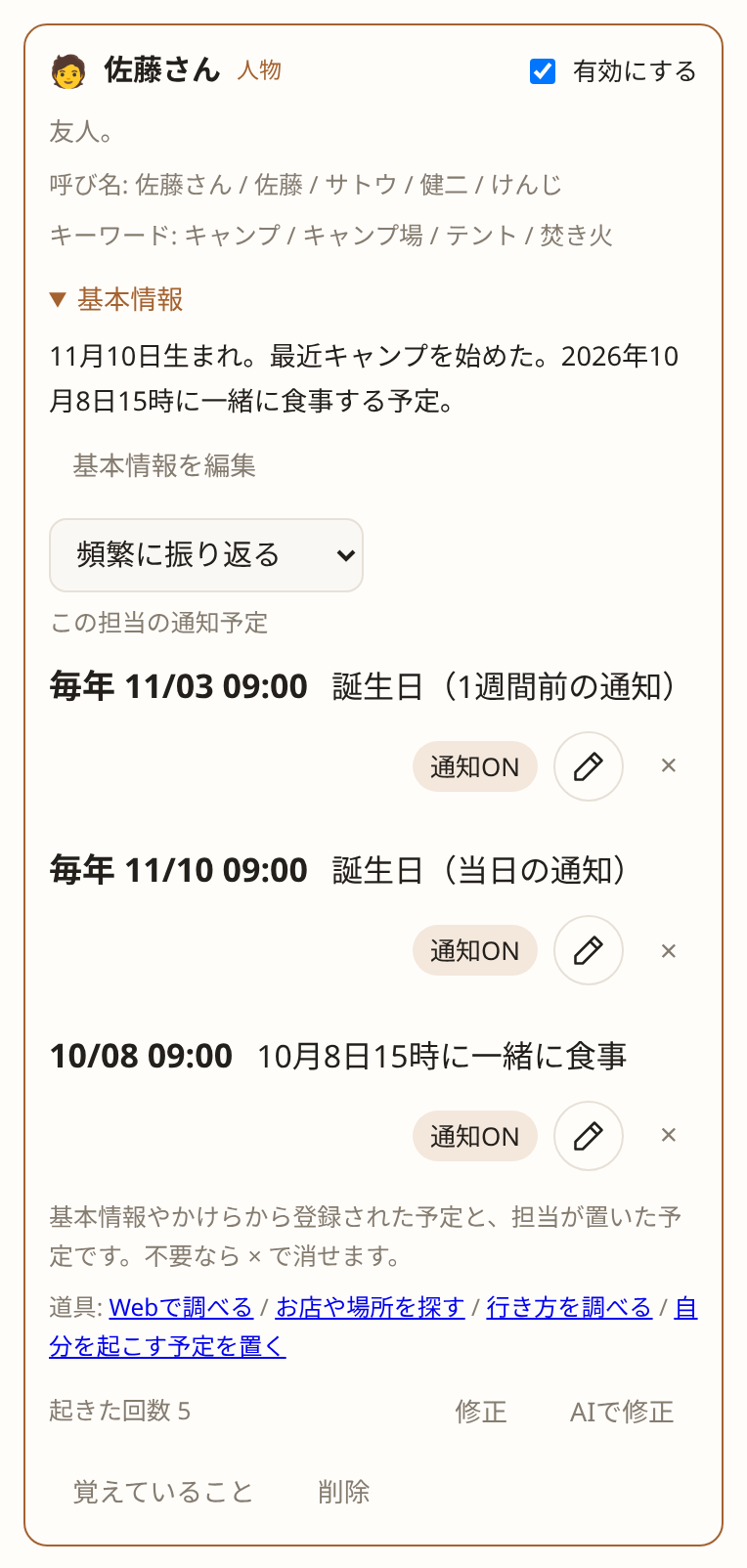
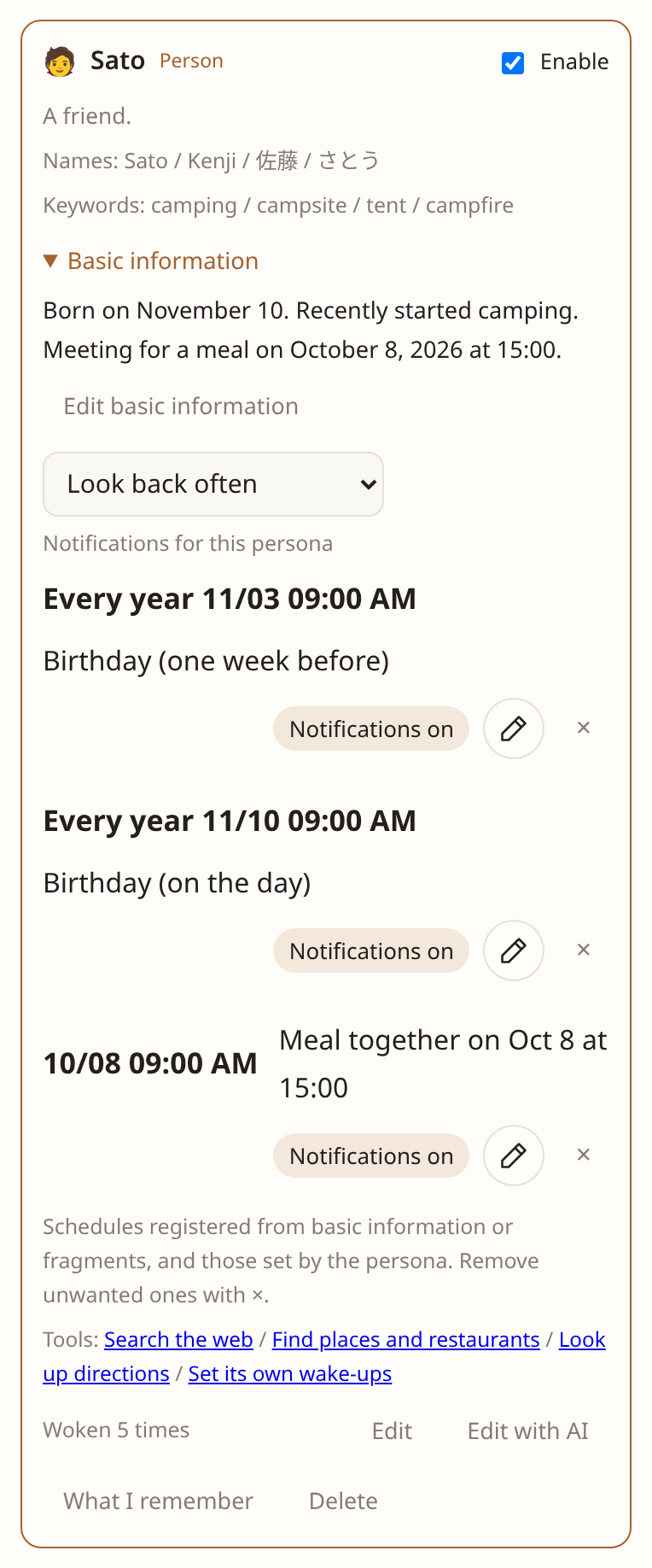
家族、恋人、友人、お世話になった人。一人ひとりに担当を置けます。「恋人の nagomi。11/10生まれで、辛いタイ料理が好き」と頼めば、呼び名とキーワード、関係性を持つ担当ができ、伝えたことがその担当の最初の記憶になります。
Family, a partner, friends, someone who helped you. Each can have a persona. Ask for “my partner nagomi, born on 10 November, loves spicy Thai food” and you get a persona with her names, keywords and relationship, and what you told it becomes its first memory.
その人の名前やキーワードが出たかけらだけを受け取り、会ったこと、話したこと、贈った物ともらった物、約束や貸し借りを覚えます。済んでいないことは、済むまで忘れません。
It takes only the fragments that mention them, and remembers meetings, conversations, presents given and received, promises and loans. What is unsettled stays until it is settled.
会う予定を書けば、その日の朝に前回の出来事を添えて。誕生日や記念日の1週間前と当日には、これまでの贈り物や好みから思いつくことと一緒に。担当のほうから知らせます。
Mention a meeting and it tells you that morning, with what happened last time. A week before and on a birthday or an anniversary, it tells you, with an idea drawn from past presents and what they like.
人物の情報は編集できる基本情報として保存します。基本情報やかけらで日付が分かれば、先の予定もその場で登録します。
Details about a person are saved as editable basic information. Known dates in basic information or fragments register notifications immediately, even for distant plans.
人との記憶から始まりましたが、それだけではありません。食事、移動、読書、やることのような関心ごとにも、同じように担当を置けます。
It started with people, but it does not stop there. Interests like food, travel, reading and follow-ups get personas the same way.
ときどき、担当から話しかける。Hear from your personas now and then.
記憶を持つ担当(「記憶する」がオンの担当)は、過去のかけらや記憶を振り返り、伝えたいことがあるときに、ときどき話しかけます。話す量や口調は、それぞれのキャラクターに合わせます。何もなければ、タイムラインも静かなまま。「記憶する」をオフにすると、この振り返りによる声かけも止まります。
Personas with Remember enabled keep memories, look back over past fragments, and speak now and then when they have something worth sharing. How much they say and their tone follow their character. Otherwise, the timeline stays quiet. Turning off Remember also stops these follow-ups.
人物の担当は「頻繁に振り返る」「ときどき振り返る」の2種類から選べます。
For people, choose “Look back often” or “Look back occasionally”.
担当からの声かけについて Hearing from your personas仕組みHow it works
入り口はひとつ。受け取り手は、人や関心ごとの担当です。
One way in. On the receiving side, a persona for each person and interest.
放り込むToss it in
書く、スクリーンショットを貼る、URLを送る、話す。どれも同じ欄から入ります。
Write a thought, paste a screenshot, send a URL, or speak. Everything goes through the same box.
担当が受け取るPersonas receive it
人物の担当にはその人の名前が出たかけらが、関心ごとの担当には関係するかけらだけが届きます。何を覚えるか、返事をするかは担当が自分で決めます。
A person's persona gets the fragments that name them; an interest's gets only those that concern it. Each decides what to remember and whether to reply.
反応があとから届くReactions arrive later
反応はタイムラインの投稿の下に遅れて並びます。答えがほしいときは @名前 で指名します。
Reactions land under your post a little later. Mention a persona with @name when you want an answer.
雑多なタイムラインが、人や関心ごとの担当を経て、担当ごとの整った記憶になる。自分で分類しなくても、内部ではこの三段に分かれます。担当が覚えなかったものも含めて、タイムライン全体はそのまま残り、あとから探せます。この構造を、使う人が理解する必要はありません。
A mixed timeline, sorted by personas into a memory kept in order for each person and interest. You never file anything, and inside it still falls into these three layers. Whatever the personas did not keep stays in the timeline as it was, and can be searched later. None of this structure needs to be understood to use it.
担当は軽いモデルから順に動き、あとの担当ほど、それまでの反応を見てから話します。前の担当の記憶をあとから直すことはあっても、同じターンで言い返すことはありません。AI同士の会話でタイムラインが埋まらないのは、このためです。
Personas run from the lightest model up, and each later one sees what was already said before it speaks. It may correct an earlier persona's memory afterwards, but never answers back in the same turn. That is why the timeline does not fill up with AIs talking to each other.
できることWhat it does
直近20件の会話を端末に保存して、次回はすぐ表示。オフラインでも投稿を保存し、アプリを開いて接続が戻ると送信します。オフライン投稿の使い方
The latest 20 conversations stay on your device for a quick start. Save posts offline and send them when the app is open and connected again. Using offline posts
公開したい会話だけ、BlueskyへShare the conversation you choose to Bluesky
自分の投稿とAI担当とのやりとりから、見せたい発言だけを選んで公開できます。食事の感想にtabeが返した一言、そのあと自分が足した返事。返信のつながりを保ったまま、自分のBlueskyアカウントのスレッドになります。
Choose the messages you want to share from a conversation with your AI personas. Your note about a meal, tabe's response, and your follow-up become a thread on your own Bluesky account, with each reply attached to its parent.
担当の返信は初期状態では未選択。本文・返信先・投稿アカウントをプレビューしてから公開します。担当の発言には「🍚 tabeからの返信:」のような署名が付きます。
Persona replies start unchecked. Preview the messages, reply structure, and account before publishing. Persona messages carry an attribution such as “🍚 tabeからの返信:” (reply from tabe).
接続と公開の手順 Connect and share a conversation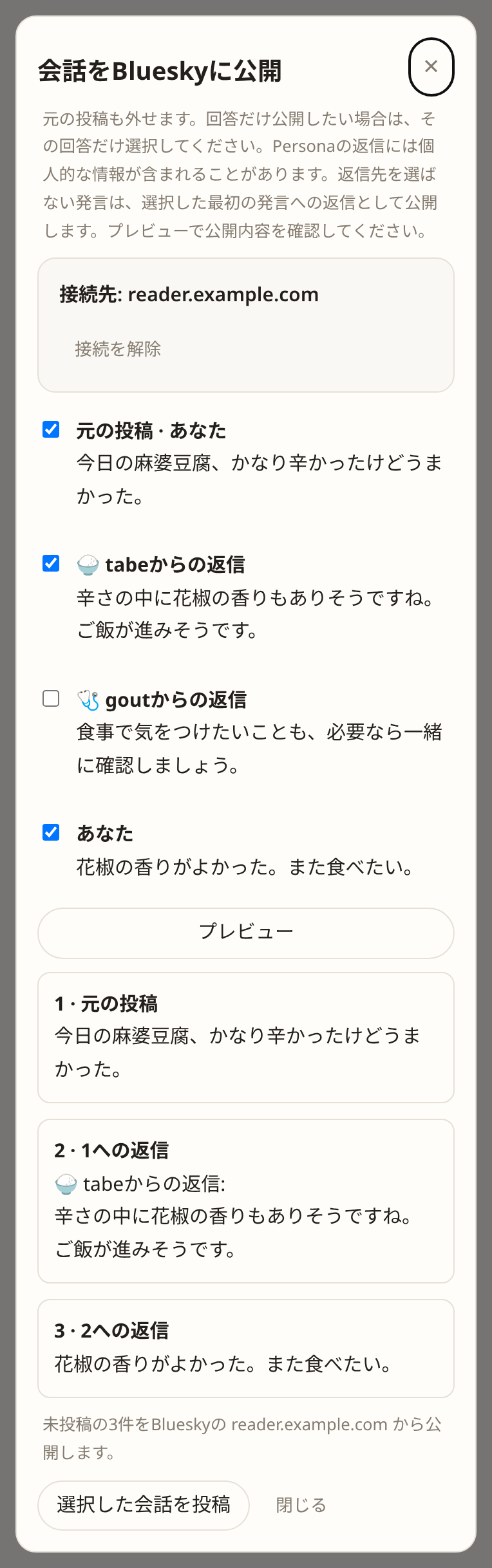
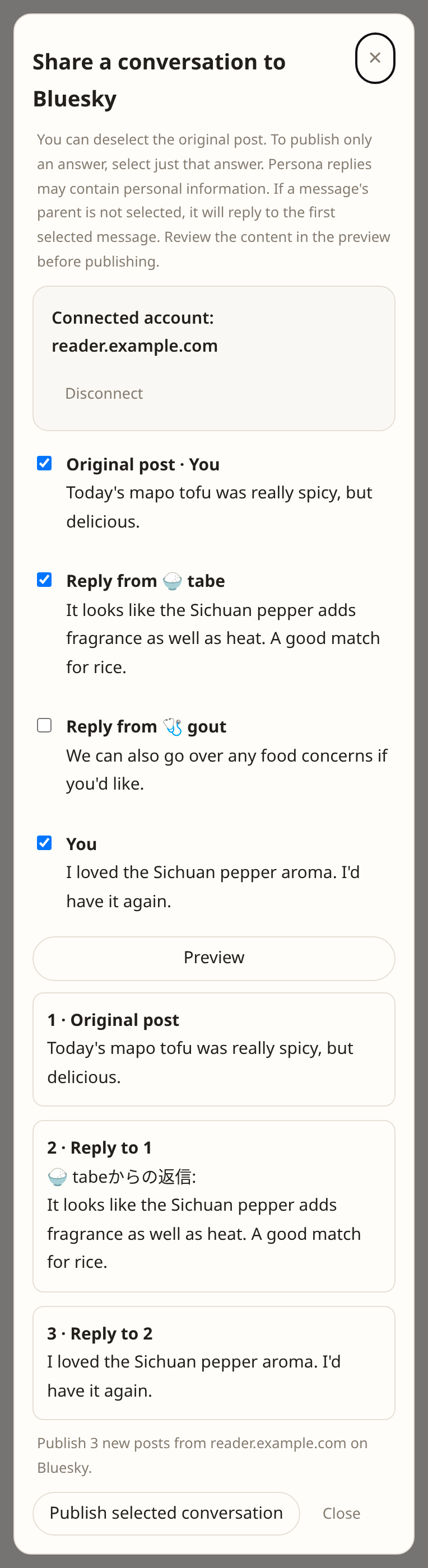
人や関心ごとに分かれた記憶Memory kept separate for each person and interest
母の担当は母との出来事を、食事の担当は好みを、読書の担当は気になった一節を覚えます。記憶を分けるので、無関係な情報が薄めません。担当は自分に関係するものだけを残すので、ただのメモも気軽に放り込めます。
Your mother's persona remembers what happened with her; the food persona learns your tastes; the reading persona remembers passages that caught your eye. Keeping memories apart stops unrelated information from diluting them. Personas keep only what concerns them, so plain notes are welcome too.
担当が何を覚えているかは、いつでも見られます。その記憶が生まれた元の投稿へ遡ることも、間違った記憶だけを忘れさせることもできます。AIの記憶を、ブラックボックスにしません。
What a persona remembers is always in view. Trace a memory back to the post it came from, or make it forget just the one that is wrong. Its memory is not a black box.
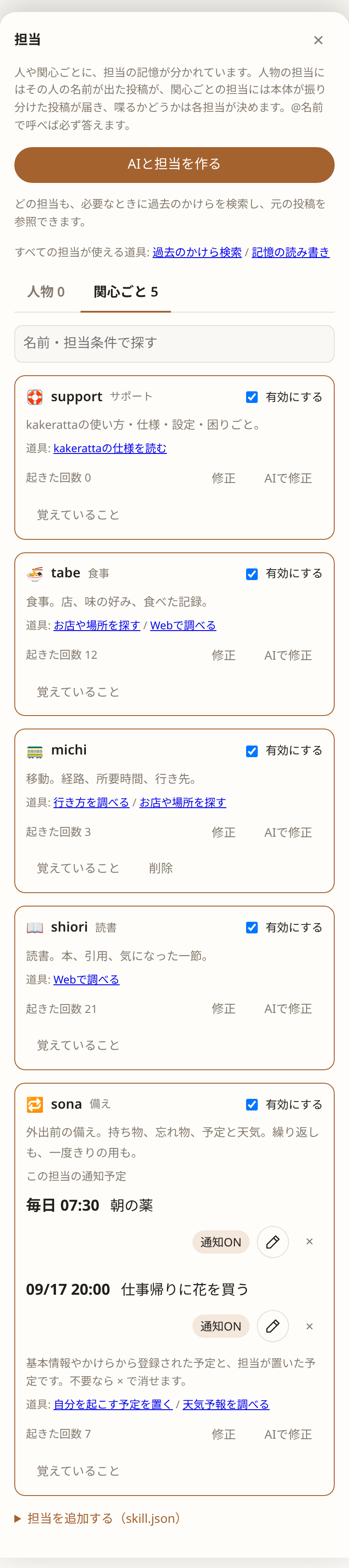

AIと担当を作るCreate your own personas with AI
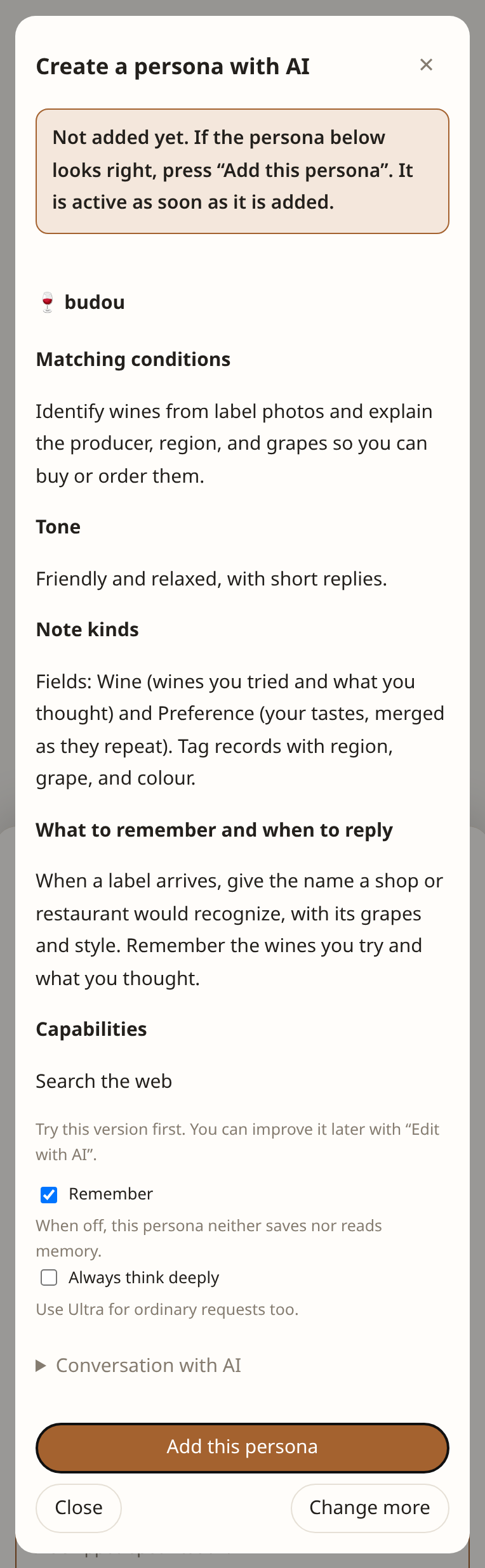
ほしい担当を自分の言葉で書くだけ。AIが名前、話し方、記憶のルールを下書きします。
Describe the persona you want in your own words. AI drafts its name, tone, and memory rules.
美味しかったワインのラベルを送るので、銘柄やブドウ品種を教えてほしい。
When I send a photo of a wine label I liked, tell me the wine and its grape varieties.
使い始めたら「AIで修正」で、話し方や覚えることを会話で育てます。組み込みの担当も同じように変えられます。
Start using it, then refine its tone and what it remembers through conversation with “Edit with AI”. Built-in personas can be edited the same way.
間違ったところだけ、教えるCorrect only what went wrong
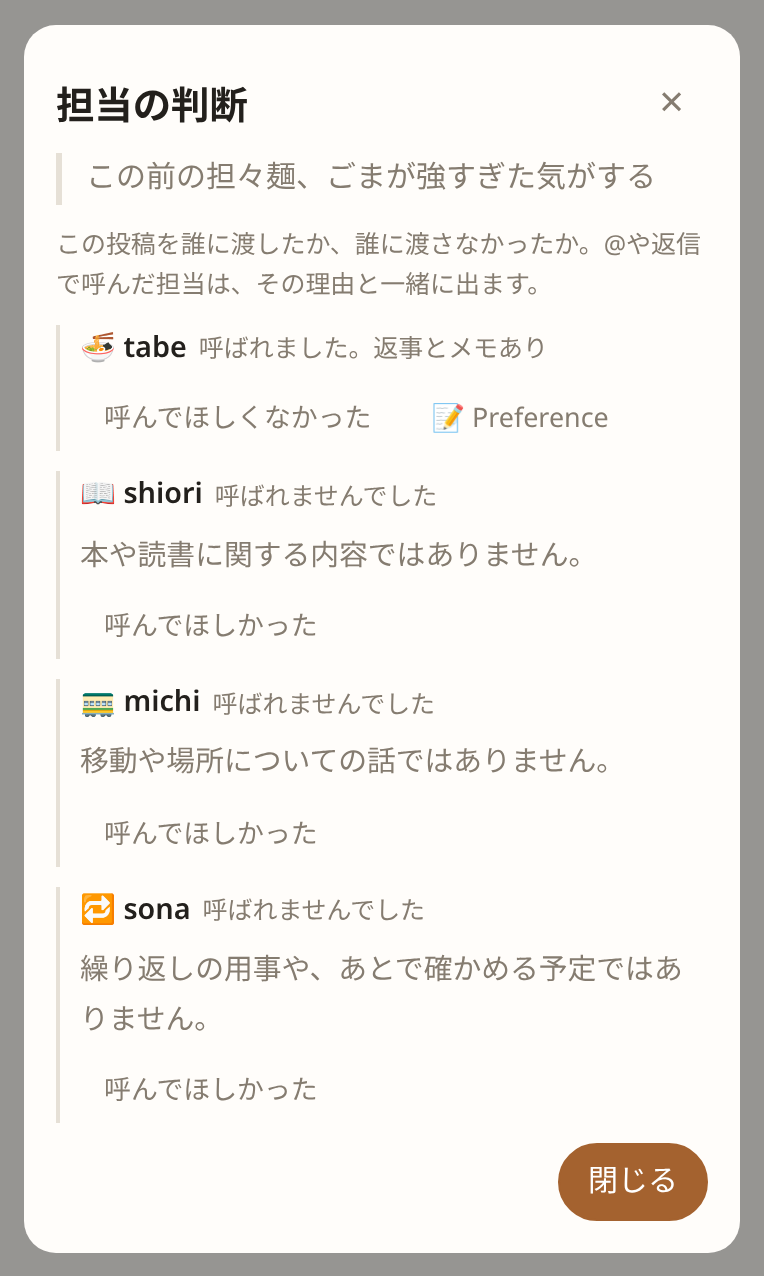
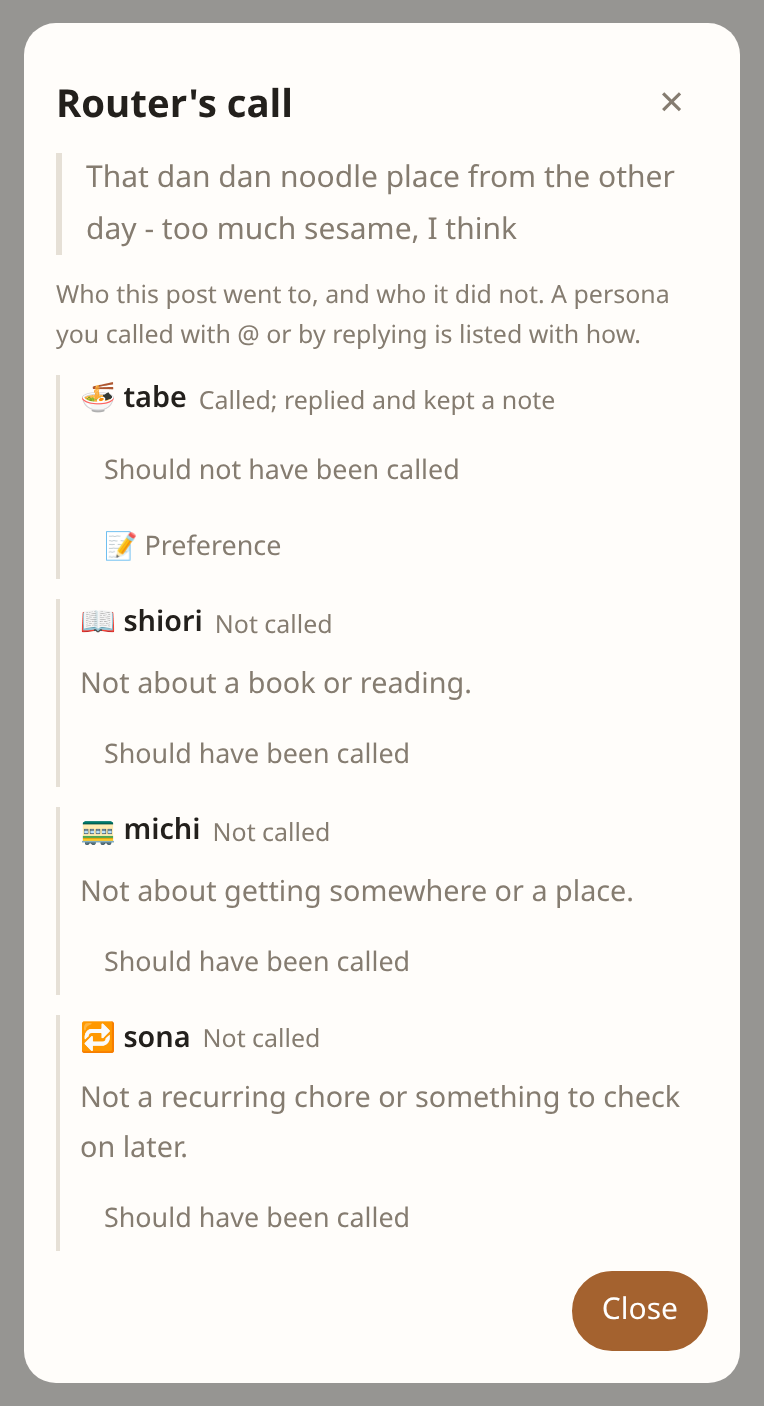
誰にかけらを渡したか、渡さなかったか。その理由は投稿ごとに見られます。違っていれば「呼んでほしかった」から理由を一言書くだけで、AIが担当条件を書き直し、同じ投稿で振り分けを試して確かめます。
Who a fragment went to, who it did not, and why - it is there on every post. When the router got it wrong, say why in a line and the AI rewrites the persona's condition, then tries the same post again to make sure.
人物の担当は条件ではなく呼び名とキーワードで届き、どの語で届いたかが出ます。届かなかったかけらからはAIがキーワードを足し、関係のないかけらが届いたら一致した語を選んで外せます。
A persona that keeps a person is reached by its names and keywords, and the word it was reached by is shown. From a fragment it missed, the AI adds keywords; when an unrelated one reached it, choose which of the matched words to remove.
返事がずれたときも同じです。発言の「返事を直す」で期待とどう違うかを伝えると、口調と指示だけが直り、同じ投稿への返事を試し書きして見せます。裏で勝手に学習することはありません。
A reply that missed works the same way: say how, and only the tone and instructions change, with a trial reply to the same post to judge by. Nothing is learned behind your back.
前に放り込んだかけらを探すFind what you tossed in before
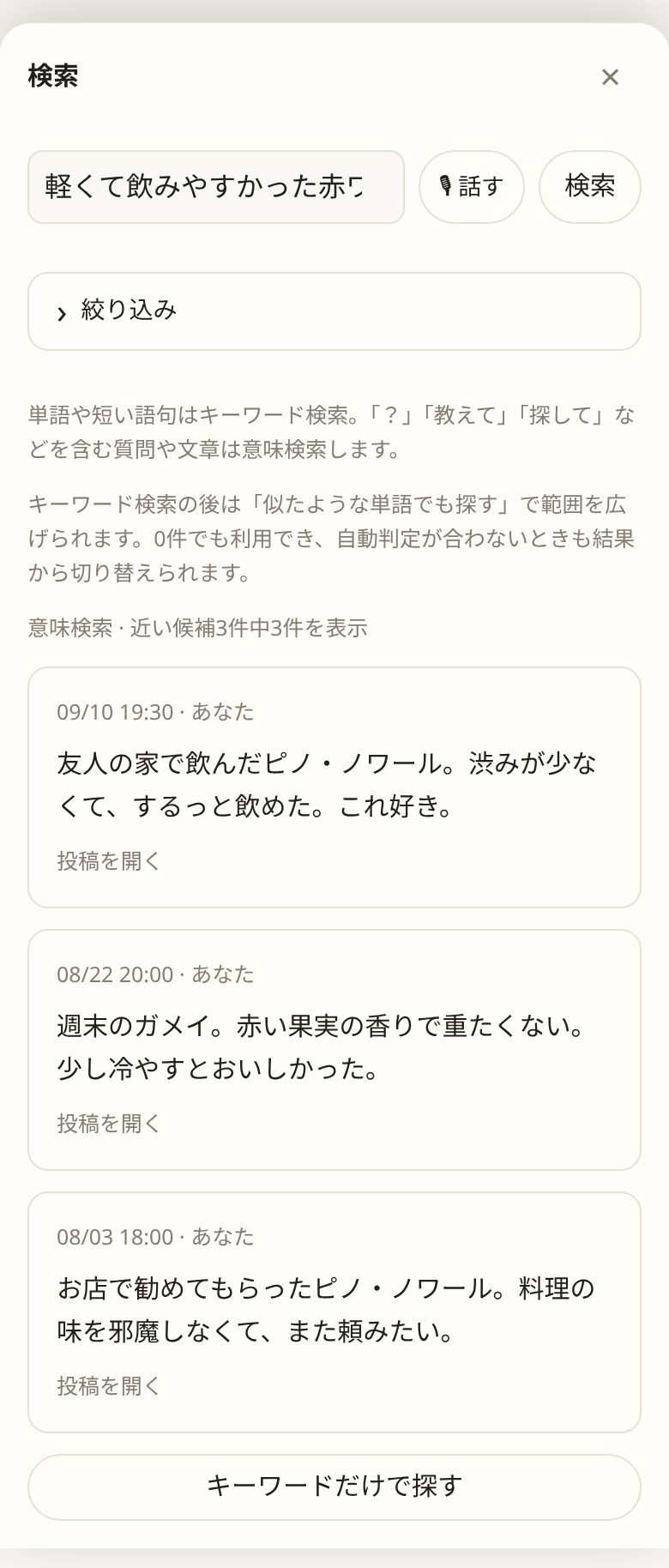
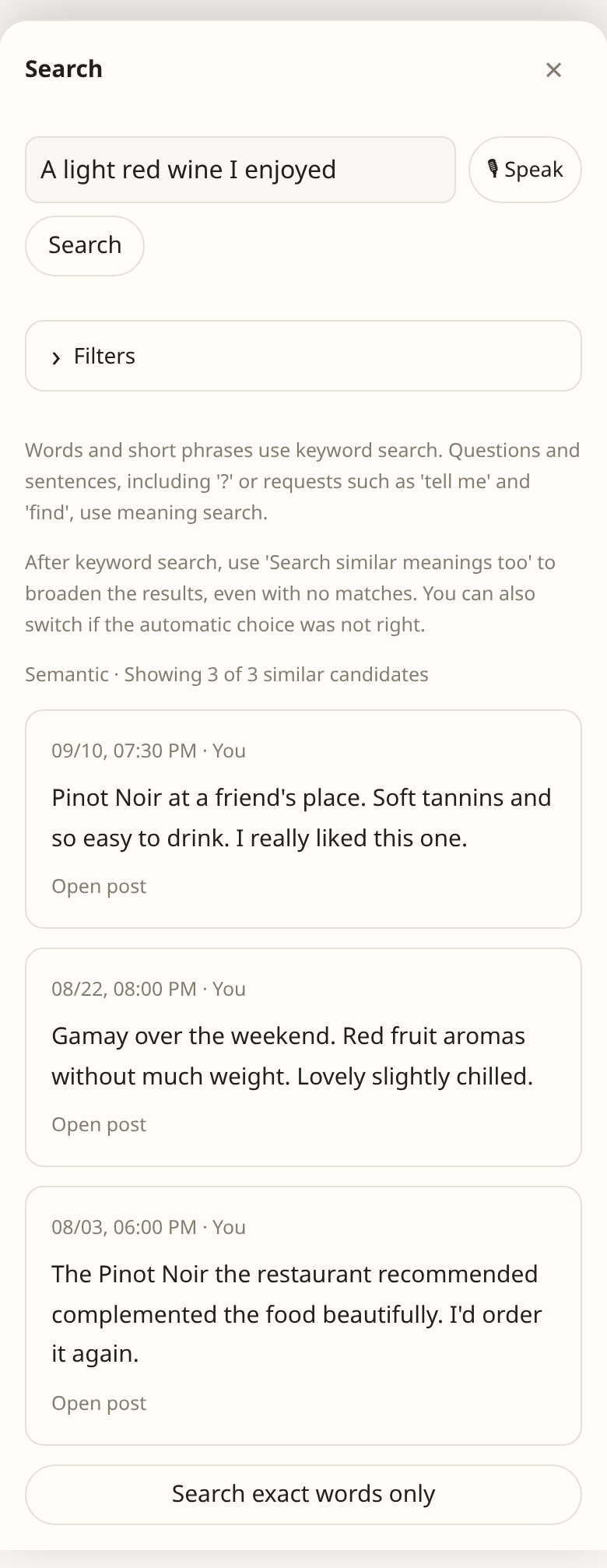
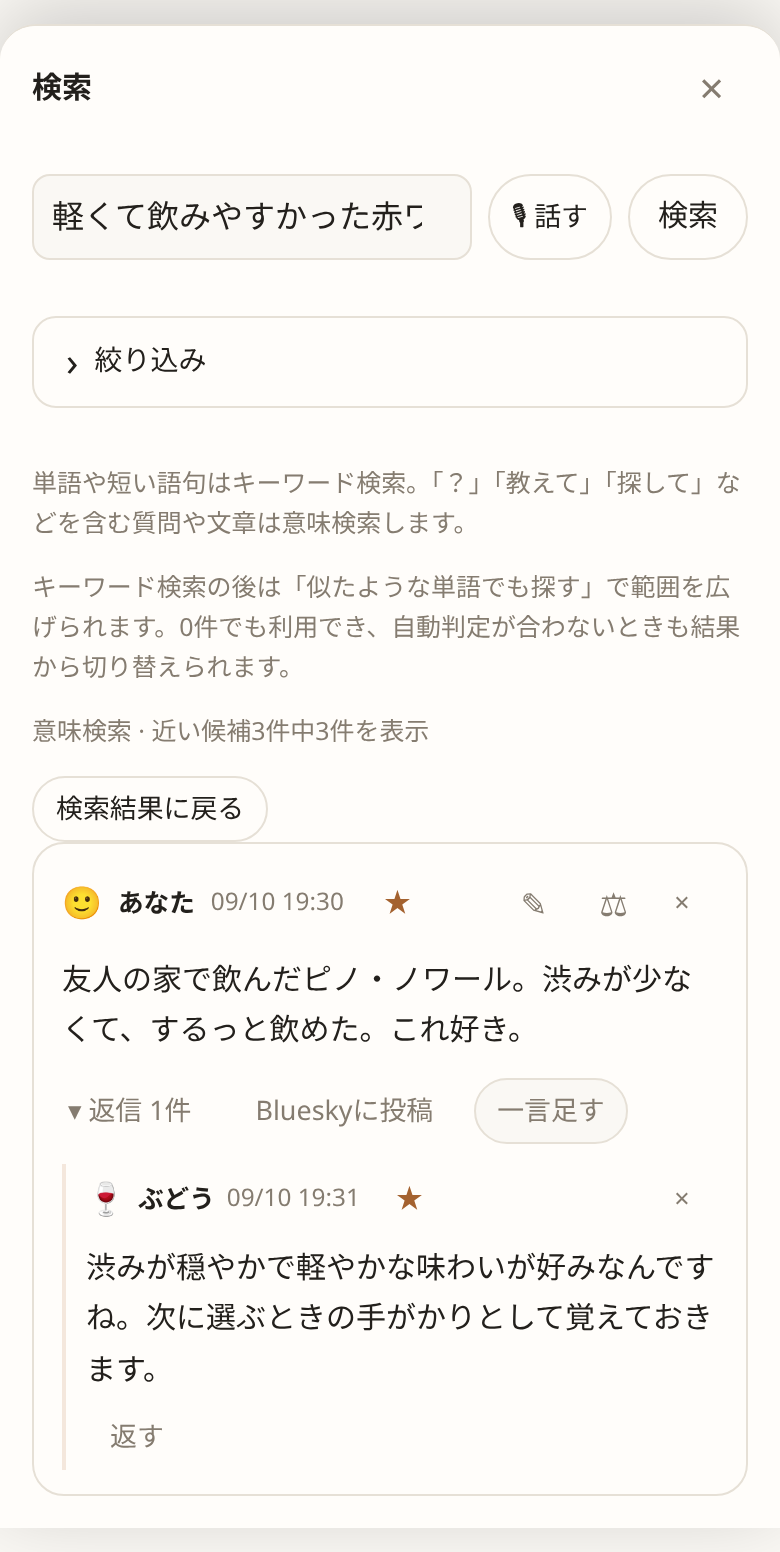
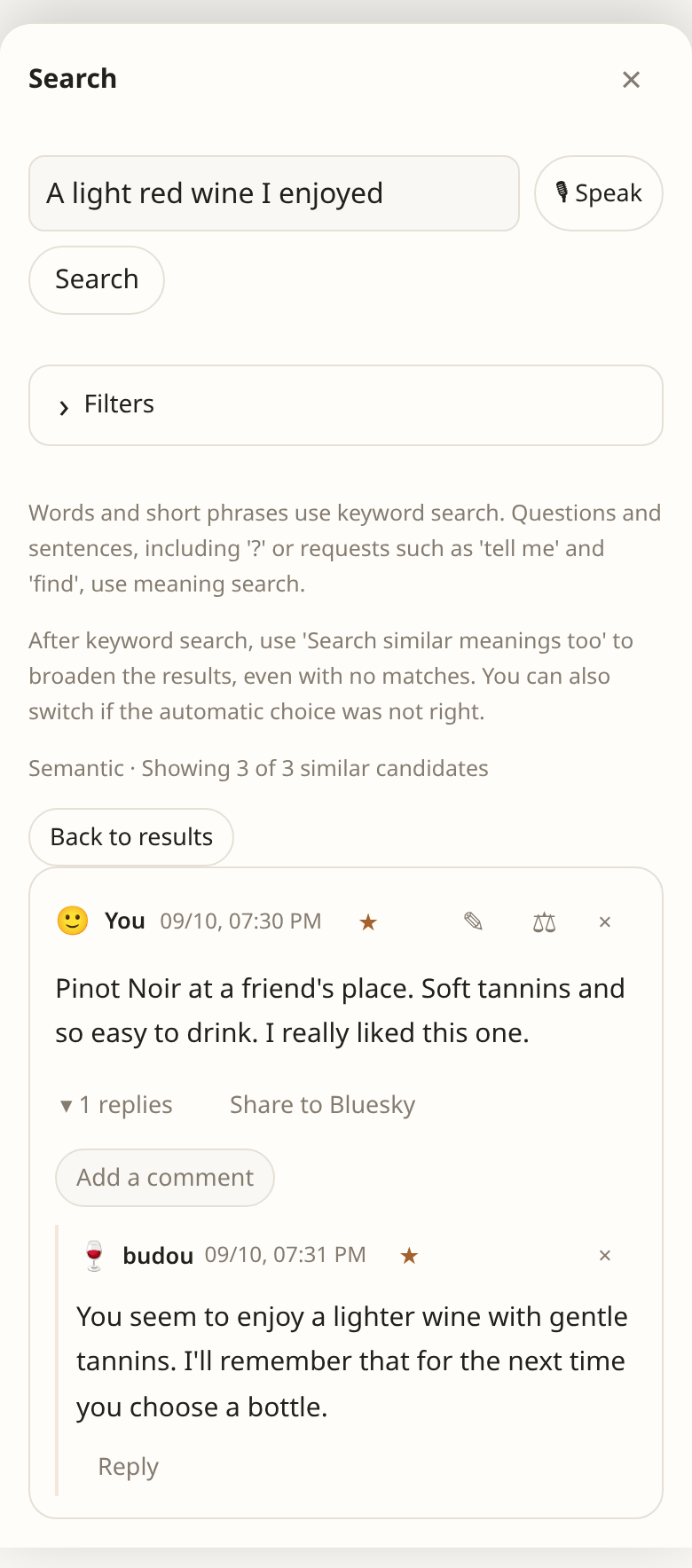
「あのとき飲んだワイン、何だったっけ?」 銘柄を忘れていても、「軽くて飲みやすかった赤ワイン」のように覚えていることから探せます。書いたメモだけでなく、写真から読み取った文字や、担当との会話も検索できます。
読み返したい担当の回答は ☆ でお気に入りに保存。最近追加した順に一覧でき、担当で絞り込めます。検索でも お気に入りのみ を選べます。
Save a useful persona answer with ☆. Revisit favorites most recently added first, filter by persona, or enable Favorites only in Search.
“What was that wine I liked?” Even if you've forgotten the name, you can search for what you remember, like “a light red wine that was easy to drink”. Search covers your notes, text read from photos, and conversations with personas.
担当も必要なときに過去のかけらを振り返り、「前に気に入ったピノに近いですね」と元の投稿へのリンク付きで答えます。
Personas look back too. A wine persona may say “This is close to the Pinot you liked before,” with a link to that post.
画面に出ていれば、撮れるIf it is on screen, you can shoot it
Kindle も有料記事も SNS も、画面に出ていればスクリーンショットで放り込めます。PCでは貼るだけ(Ctrl+V)、スマホは画像を選ぶかカメラで撮るだけ。読んだ文字は担当が読み取り、検索の対象にもなります。
Kindle, a paywalled article, a social feed: if it is on screen, a screenshot brings it in. Paste on a PC (Ctrl+V); on a phone, pick the image or take a photo. The text is read and becomes searchable.
声でも入ります。話し終わりの合図を決めておけば、手を使わずに投稿できます。
Speech works too. Set a send phrase and post without touching the screen.
最初からいる、関心ごとの担当Interest personas that ship with the app
名前はどのキーボードでも打てるローマ字です。@tabe のように指名できます。投稿した言語で答えます。
Their names are Japanese words in Latin letters, so @tabe can be typed on any keyboard. A persona answers in the language the post was written in.
店、料理、飲み物、食事やメニューの写真。「何食べよう」。
Places, dishes, drinks, photos of meals and menus. “What should I eat?”
kakerattaの使い方・設定・困りごと。同梱の仕様を読んで答えます。新規利用時は有効です。
Questions about kakeratta, its settings and problems using it. Answers from the shipped specification. Active by default in new workspaces.
「インフォグラフィックにして」で文章・URL記事・画像の読み取り内容をHTMLで図解。表示言語へ翻訳。記憶なし、常にUltraです。
HTML infographics of text, expanded articles and interpreted images, in your display language. No memory; always Ultra.
電子書籍のキャプチャ、引用、書名と著者、読んだ感想。
E-book captures, quoted passages, titles and authors, thoughts on a read.
出かける前の鍵と財布。今晴れていても帰りは雨なら傘。予定と、いつもの持ち物や忘れた経験を合わせて、必要な瞬間に一言添えます。新規利用時は有効です。
Keys and wallet before leaving. An umbrella when sunshine now will turn to rain on the way home. It brings plans, belongings and past omissions together for a timely word. Active by default in new workspaces.
動かしているモデルThe models behind it
Kakeratta は Nebius Token Factory を通じて NVIDIA Nemotron モデルを使います。ふだんは Super、常に熟考する担当は Ultra で答え、「もっと詳しく」「違う」と返すとその返信には Ultra が答えます。
Kakeratta uses NVIDIA Nemotron models through Nebius Token Factory. Personas normally answer on Super, or Ultra with Always think deeply on; reply "tell me more" or "that's wrong" and that reply is answered on Ultra.
- Nemotron 3.5 Lightning — 返信がより深い回答を求めているかの判定Nemotron 3.5 Lightning — noticing when a reply asks for a deeper answer
- Nemotron Super — 振り分けと、通常の担当の回答Nemotron Super — routing and ordinary persona answers
- Nemotron Ultra — より良い・深い回答を求められたときの推論Nemotron Ultra — deeper reasoning when you ask for a better answer
- GLM-5.3-Flash — 画像の読み取り(同じ基盤)GLM-5.3-Flash — image reading, on the same backend
今日のかけらを、放り込んでみるStart with today’s fragment
利用には Nebius Token Factory の API キーが必要です。設定の手順は使い方ページにあります。
You need a Nebius Token Factory API key. The manual walks through the setup.